
Introduction
Most AI applications stop at generating text.
You ask:
“What is the status of order 10452?”
The AI responds with an explanation—but it doesn’t actually check the order system.
An AI agent works differently.
Instead of only generating an answer, an agent can:
- understand the user’s goal
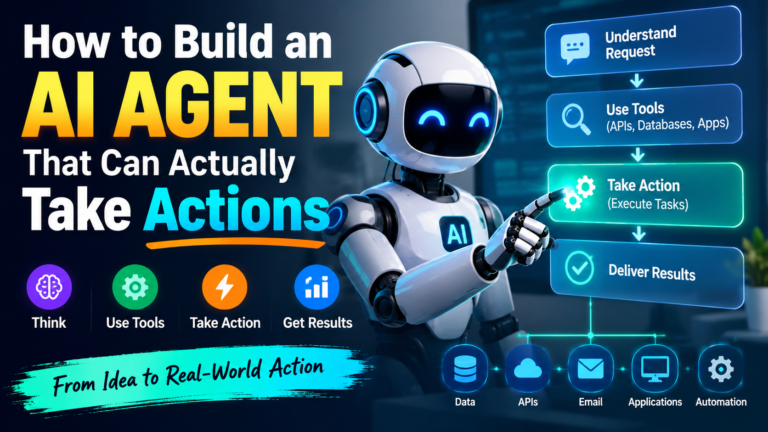
- decide what information it needs
- call an external tool
- inspect the tool’s result
- decide what to do next
- perform an action
- verify the result
- report what happened
For example:
User
 │
 │ "Check order 10452 and email the customer
 │  if it has been delayed."
 ↓
AI Agent
 │
 ├── check_order()
 │
 ├── analyze status
 │
 ├── if delayed → send_email()
 │
 └── report result
 ↓
User
This is the fundamental shift from AI that answers questions to AI that performs work.
1. What Is an Action-Taking AI Agent?
A traditional LLM application looks like:
User → LLM → ResponseAn agent looks more like:
                  ┌─────────────┐
                  │     LLM     │
                  └──────┬──────┘
                         │
                  Decide next step
                         │
              ┌──────────┴──────────┐
              ↓                     ↓
        Call a tool             Respond
              │
              ↓
        Tool result
              │
              └──────→ LLM
                         │
                   Decide again
The important component is the tool.
A tool gives the model a controlled way to interact with the outside world.
Examples:
get_customer()
get_order()
search_database()
send_email()
create_ticket()
update_inventory()
create_invoice()
run_report()
Modern agent frameworks support exactly this pattern. For example, the OpenAI Agents SDK describes tools as mechanisms that allow agents to fetch data, call APIs, execute code, or interact with computers.
2. The Five Components of an AI Agent
A practical agent usually contains five major components.
1. Model
The reasoning engine.
GPT / other LLM2. Instructions
Defines what the agent is supposed to accomplish.
You are an order-management agent.

You can inspect orders and send customer emails.

Never cancel an order without confirmation.
3. Tools
Functions the agent can call.
get_order()
send_email()
cancel_order()
4. State / Memory
Keeps information across steps.
Customer ID
Order ID
Previous tool results
Conversation context
5. Guardrails
Controls what the agent is allowed to do.
Read order → automatic
Send email → automatic
Refund ₹50,000 → human approval
Delete customer → prohibited
Guardrails and human-in-the-loop mechanisms are now built into modern agent SDKs because tool access creates a very different security model from a simple chatbot.
3. Build Your First Action-Taking Agent
Let’s create a simple Python agent.
Our example agent will manage orders.
The user might say:
“Check order 1001.”
The agent should call:
get_order(1001)and return the actual result.
Install the SDK
pip install openai-agentsThen configure your API key:
export OPENAI_API_KEY="your-api-key"On Windows:
setx OPENAI_API_KEY "your-api-key"4. Create Your First Tool
A tool is simply a function that the agent is allowed to use.
from agents import Agent, Runner, function_tool


@function_tool
def get_order(order_id: str) -> dict:
    """Get the current status of an order."""

    orders = {
        "1001": {
            "status": "shipped",
            "customer": "John",
            "tracking": "TRK12345"
        },
        "1002": {
            "status": "delayed",
            "customer": "Sarah",
            "tracking": "TRK67890"
        }
    }

    return orders.get(
        order_id,
        {"status": "not_found"}
    )
The important part is:
@function_toolThis exposes the Python function to the agent as a callable tool.
5. Create the Agent
Now create an agent that understands how to use the function.
agent = Agent(
    name="Order Assistant",

    instructions="""
    You are an order management assistant.

    When the user asks about an order,
    use the get_order tool.

    Do not invent order information.
    """,

    tools=[
        get_order
    ]
)
The architecture is now:
                 User
                  │
                  ↓
          ┌───────────────┐
          │ Order Agent   │
          └───────┬───────┘
                  │
             Need order?
                  │
                  ↓
            get_order()
                  │
                  ↓
             Order DB
                  │
                  ↓
             Tool result
                  │
                  ↓
                Agent
                  │
                  ↓
              Response
6. Run the Agent
result = Runner.run_sync(
    agent,
    "What is the status of order 1001?"
)

print(result.final_output)
The agent can decide that it needs the order information and invoke the tool.
This is fundamentally different from putting the order information into the prompt.
The model is now connected to an actual capability.
7. Give the Agent Multiple Tools
This is where things become much more interesting.
Suppose our agent can:
get_order()
send_email()
create_support_ticket()
update_order()
We can expose all of them.
@function_tool
def send_email(
    email: str,
    subject: str,
    message: str
) -> str:

    print(f"Sending email to {email}")
    print(subject)
    print(message)

    return "Email sent successfully"
Then:
agent = Agent(
    name="Customer Operations Agent",

    instructions="""
    You are a customer operations agent.

    You can:
    - check orders
    - send customer emails

    Always check the order before sending an email.
    Never invent order information.
    """,

    tools=[
        get_order,
        send_email
    ]
)
Now the agent can perform a multi-step workflow.
8. The Agent Loop
Suppose the user says:
“Check order 1002 and notify the customer if it’s delayed.”
The agent might perform:
Step 1
Understand request

        ↓

Step 2
Call get_order("1002")

        ↓

Step 3
Receive:

status = delayed

        ↓

Step 4
Decide:
Customer needs notification

        ↓

Step 5
Call send_email()

        ↓

Step 6
Receive:

Email sent successfully

        ↓

Step 7
Tell user what happened
Conceptually:
while not task_complete:

    decision = model(
        user_request,
        available_tools,
        previous_results
    )

    if decision.requires_tool:

        result = execute_tool(
            decision.tool,
            decision.arguments
        )

        add_result_to_context(result)

    else:
        return decision.response
This agent loop is the heart of an action-taking AI system. Modern agent SDKs provide this loop so developers don’t have to implement all of the orchestration themselves.
9. Connecting Real APIs
A real production agent shouldn’t use hard-coded dictionaries.
Instead:
AI Agent
   │
   ├── ERP API
   ├── CRM API
   ├── Database
   ├── Email API
   ├── Ticketing system
   └── Payment system
For example:
@function_tool
def get_order(order_id: str):

    response = requests.get(
        f"https://api.example.com/orders/{order_id}"
    )

    response.raise_for_status()

    return response.json()
Now the AI isn’t pretending to know the order status.
It retrieves the actual data.
10. MCP Makes Tool Integration Easier
Another important development in agent architecture is Model Context Protocol (MCP).
MCP provides a standardized way for applications to expose tools and context to AI models. The current MCP ecosystem also supports remote and local server patterns and has been evolving toward stronger authorization and scalability.
Instead of building every integration specifically for one agent:
Agent
 │
 ├── Custom ERP integration
 ├── Custom CRM integration
 ├── Custom database integration
 └── Custom filesystem integration
you can have:
                    AI Agent
                       │
                 MCP Interface
                       │
       ┌───────────────┼───────────────┐
       ↓               ↓               ↓
     ERP MCP         CRM MCP        Database MCP
       │               │               │
      ERP             CRM             DB
This makes tools more reusable across agent applications.
11. Don’t Give the Agent Unlimited Power
This is one of the most important lessons.
An agent with:
database write access
+
email access
+
payment access
+
filesystem access
can potentially cause serious damage if something goes wrong.
Instead, use permission levels.
Level 1 — Read
get_order()
search_customer()
get_inventory()
Level 2 — Low-risk actions
create_ticket()
draft_email()
generate_report()
Level 3 — Sensitive actions
send_email()
update_order()
Level 4 — High-risk actions
refund_payment()
delete_customer()
cancel_order()
High-risk actions should require approval.
Agent
  │
  ↓
"Refund ₹50,000?"
  │
  ↓
Human approval
  │
 ┌┴┐
Yes No
This is especially important because current agent systems are increasingly capable of operating autonomously, making tool permissions and shutdown/containment mechanisms an active safety concern.
12. Add Human-in-the-Loop
Instead of:
refund_payment(amount)use:
request_refund(amount)which produces:
Refund requested:

Customer: John
Order: 1001
Amount: ₹25,000

Approve?
Only after approval:
execute_refund()This gives us:
AI decides
     ↓
Risk check
     ↓
Human approval
     ↓
Tool execution
This is a much safer production architecture.
13. Add Logging
Every tool call should be recorded.
Agent started
     ↓
Tool: get_order
Arguments: 1002
     ↓
Result: delayed
     ↓
Tool: send_email
Arguments: customer@example.com
     ↓
Result: success
     ↓
Agent completed
This gives developers an audit trail.
Modern agent tooling also includes tracing capabilities for visualizing and debugging agent workflows.
14. From One Agent to Multiple Agents
Once one agent becomes complicated, split responsibilities.
                    Supervisor
                        │
          ┌─────────────┼─────────────┐
          ↓             ↓             ↓
     Order Agent   Customer Agent   Finance Agent
          │             │             │
        ERP             CRM          Payments
For example:
User:
"Check the delayed order and issue a refund if
the customer qualifies."

Supervisor
    ↓
Order Agent
    ↓
Customer Agent
    ↓
Finance Agent
    ↓
Human approval
    ↓
Refund
Modern agent frameworks support agent handoffs and agents-as-tools for this type of orchestration.
15. Production Architecture
A more realistic architecture looks like this:
                         USER
                           │
                           ↓
                    ┌─────────────┐
                    │ API / Chat  │
                    └──────┬──────┘
                           ↓
                  ┌─────────────────┐
                  │   AI AGENT      │
                  │                 │
                  │ Planning        │
                  │ Reasoning       │
                  │ Tool Selection  │
                  └────────┬────────┘
                           │
             ┌─────────────┼─────────────┐
             ↓             ↓             ↓
          Database        APIs          MCP
             │             │             │
             ↓             ↓             ↓
           ERP            CRM        External Tools
             │             │             │
             └─────────────┼─────────────┘
                           ↓
                    Tool Results
                           │
                           ↓
                     AI Agent
                           │
                    ┌──────┴──────┐
                    ↓             ↓
                Automatic     Human Approval
                    │             │
                    └──────┬──────┘
                           ↓
                         Action
16. The Big Difference
A chatbot:
Question
   ↓
Answer
An AI agent:
Goal
 ↓
Understand
 ↓
Plan
 ↓
Select tool
 ↓
Execute
 ↓
Observe
 ↓
Reason again
 ↓
Execute next action
 ↓
Verify
 ↓
Complete
That’s why agentic AI is becoming much more interesting than simply adding an LLM chat window to an application.
17. Where This Becomes Really Powerful
The same architecture can be applied to almost any business workflow.
Manufacturing
AI Agent
   ↓
PLC Data
   ↓
MES
   ↓
Quality Database
   ↓
Detect abnormal production
   ↓
Create maintenance ticket
   ↓
Notify engineer
IT
Monitor
   ↓
Detect server failure
   ↓
Investigate logs
   ↓
Restart service
   ↓
Verify
   ↓
Create incident report
Finance
Invoice received
   ↓
Extract information
   ↓
Validate PO
   ↓
Check supplier
   ↓
Approve / escalate
   ↓
Update ERP
Customer Support
Customer request
       ↓
Search CRM
       ↓
Check order
       ↓
Determine solution
       ↓
Update ticket
       ↓
Send response
Conclusion
The next generation of AI applications won’t simply generate text.
They will interact with software, databases, APIs, machines and business systems.
The basic architecture is surprisingly simple:
             LLM
              │
        ┌─────┴─────┐
        │   Tools   │
        └─────┬─────┘
              │
      ┌───────┼────────┐
      ↓       ↓        ↓
     API      DB      MCP
      │       │        │
      └───────┼────────┘
              ↓
           Results
              ↓
             LLM
              ↓
            Action
The difficult part isn’t making an LLM call a function. The real engineering challenge is making autonomous actions reliable, observable, permissioned, reversible, and safe.
That is where production-grade AI agents will differentiate themselves from simple chatbots.