
If you’re creating AI ads, product promos, or cinematic videos, character consistency becomes even more critical—because your character represents a brand, story, or product identity.
Below is a practical framework + ready-to-use prompts tailored for your use cases 👇
🎯 1. Core Concept (For AI + Ads + Cinema)
You are not just creating a character. You are creating a:
- 🎥 Film Actor (cinematic storytelling)
- 🛍️ Brand Ambassador (ads & products)
- 🤖 AI Identity Anchor (stable across generations)
👉 So your character must be:
- Recognizable instantly
- Emotionally expressive
- Visually consistent in every frame
🧩 2. 3-Layer Consistency System
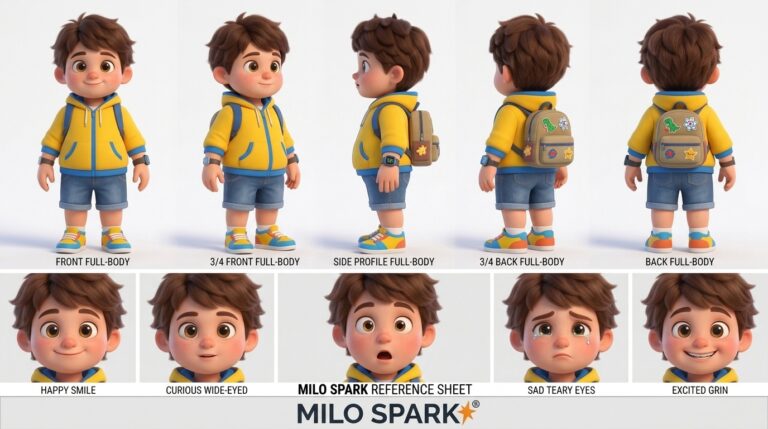
Create a professional character reference sheet based strictly on the uploaded reference image. Use a clean, neutral plain background and present the sheet as a technical model turnaround while matching the exact realistic visual style of the reference (same realism level, rendering approach, texture, color treatment, and overall aesthetic). Arrange the composition into two horizontal rows. Top row: four full-body standing views placed side-by-side in this order: front view, left profile view (facing left), right profile view (facing right), back view. Bottom row: three highly detailed close-up portraits aligned beneath the full-body row in this order: front portrait, left profile portrait (facing left), right profile portrait (facing right). Maintain perfect identity consistency across every panel. Keep the subject in a relaxed A-pose and with consistent scale and alignment between views, accurate anatomy, and clear silhouette; ensure even spacing and clean panel separation, with uniform framing and consistent head height across the full-body lineup and consistent facial scale across the portraits. Lighting should be consistent across all panels (same direction, intensity, and softness), with natural, controlled shadows that preserve detail without dramatic mood shifts. Output a crisp, print-ready reference sheet look, sharp details.🔹 Layer 1: Identity Lock (MOST IMPORTANT)
Define once and never change:
- Face proportions (eyes, nose, jaw)
- Hair style & volume
- Skin tone
- Outfit colors
💡 Tip: Treat this like a logo → no variation allowed
🔹 Layer 2: Style Lock
Fix your rendering style:
- Pixar / Realistic / Semi-realistic
- Texture softness
- Lighting type (studio / cinematic / natural)
🔹 Layer 3: Motion Consistency
For video & ads:
- Same walking style
- Same expression transitions
- Same energy level
🎥 3. AI Cinematic Prompt (Character + Camera + Emotion)
Use this for movie-style shots 👇
{
  "style": "cinematic ultra-realistic 3D, soft global illumination, high detail textures",
  "character_reference": "use uploaded character, maintain exact identity, same face proportions, hairstyle, outfit, colors",
  "scene": "urban street at sunset with warm cinematic lighting",
  "lighting": "golden hour, soft shadows, volumetric light rays",
  "camera": "medium close-up, shallow depth of field, cinematic lens 50mm",
  "action": "character walks forward confidently, slight smile, natural motion",
  "emotion": "calm, confident, inspiring",
  "consistency_rules": [
    "no change in facial structure",
    "no color variation",
    "same outfit and textures",
    "consistent lighting tone"
  ],
  "quality": "4K, film-grade, sharp focus, cinematic composition"
}
🛍️ 4. AI Product / Ad Prompt (Brand + Character)
Use this for ads & product promotions 👇
{
  "style": "high-quality 3D Pixar-style, clean commercial lighting",
  "character_reference": "strictly match reference character identity",
  "background": "minimal studio background with soft gradient",
  "lighting": "bright, soft, product-focused lighting",
  "camera": "front medium shot, centered composition",
  "action": "character holding product and smiling naturally",
  "emotion": "friendly, trustworthy, engaging",
  "product_focus": "highlight product clearly in hands",
  "branding_rules": [
    "character must remain identical",
    "no distortion in proportions",
    "consistent color palette",
    "clear product visibility"
  ],
  "output": "advertisement-ready, clean, sharp, high resolution"
}
🎬 5. AI Video Consistency Prompt (Multi-Shot Control)
Use this when generating multiple shots or scenes 👇
{
  "character": {
    "identity_lock": "same face, same proportions, same outfit, same textures",
    "reference_image": "attached",
    "consistency": "strict"
  },
  "shots": [
    {
      "type": "wide shot",
      "action": "character standing and looking around",
      "camera": "slow pan left"
    },
    {
      "type": "medium shot",
      "action": "character talking and smiling",
      "camera": "static cinematic"
    },
    {
      "type": "close-up",
      "action": "character emotional expression",
      "camera": "slow zoom in"
    }
  ],
  "global_rules": [
    "no identity drift",
    "consistent lighting across shots",
    "same rendering style",
    "smooth motion transitions"
  ]
}
🚀 6. Pro Workflow (Industry Style)
Step 1: Create Reference Sheet ✅
👉 (You already did this — perfect)
Step 2: Lock Character in AI
- Use same prompt + seed
- Always attach reference image
Step 3: Generate Scenes
- Ads → clean studio
- Cinema → dynamic lighting
- Product → focus on interaction
Step 4: Maintain Pipeline
- Same model
- Same settings
- Same prompt structure
🔥 7. Cinematic Enhancements (Next Level)
Add these for pro-level output:
- 🎥 Depth of field (blur background)
- 🌫️ Volumetric lighting
- 🎞️ Film grain (subtle)
- 🎨 Color grading (warm / teal-orange)
❌ Mistakes in Ads & AI Videos
- Character face changing slightly
- Lighting mismatch between shots
- Product overshadowing character
- Overacting expressions (breaks realism)
🏁 Final Insight
For AI Ads + Cinema, consistency = trust + realism + brand identity
👉 Your character should feel like:
- A real actor
- A consistent brand face
- A reusable digital asset